v0.2.0
Free · Open source · Windows · GGUF

Run models bigger than your GPU.

tierlm fills your graphics card's memory first and puts the rest of the model in system RAM, automatically. A 46 GB model on a 32 GB card. A 15 GB model on an 8 GB laptop. Unzip, double-click, pick a model.

Qwen3.6-35B-A3B Q8_0 · 46 GB file · 128K contextRTX 5090 (32 GB) + 64 GB RAM → 36.6 tokens/s
VRAM32 GB
System RAM64 GB
Model in VRAM (GPU) Context (KV cache) Model in RAM (CPU) Working memory, Windows and other programs

Illustration of how tierlm splits a model that doesn't fit. The setup screen shows the real numbers for your PC before you load.

Why tierlm

Built for models that don't fit

Most local AI apps run a model on your graphics card, and leave it to you to work out what to do when it doesn't fit. tierlm starts from that problem: VRAM is fast but small, RAM is big but slower, and the right split depends on the model and your PC.

Automatic placement

tierlm works out where every part of the model goes, VRAM first and then RAM, and shows you before you load: the model, its context, and what other programs are using. No offload settings to guess.

Its own engine

Tokenizers, model graphs, memory planner and server are tierlm's own, built on the ggml math library. It isn't a wrapper around another app, and every model family is checked against an independent reference.

Made for mixture-of-experts

MoE models use a few experts per word. tierlm is designed around that: a live expert activity map today, and soon a cache that keeps the busiest experts in VRAM.

One download, any GPU

CUDA on NVIDIA RTX cards, Vulkan on Intel Arc and AMD Radeon, or the CPU. Unzip and double-click: no Python, no CUDA toolkit, no installers.

Works with your apps

An OpenAI-compatible API for Open WebUI, Continue, LibreChat and scripts, with an Allow other devices switch and an optional API key.

Open source

MIT-licensed on GitHub. Use it, read it, change it, build on it.

Measured on real hardware

Big models, ordinary PCs

Mixture-of-experts models (names with A3B, A10B...) use only a small part of the model for each word, so they stay fast even when most of the model lives in RAM. They're what tierlm is made for.

36.6tok/s
46 GB model on a 32 GB GPU
Qwen3.6-35B-A3B Q8_0 on an RTX 5090 with 64 GB RAM, 128K context, CUDA. A new-user test: the release zip with nothing else installed.
27.1tok/s
14.7 GB model on an 8 GB laptop
Qwen3-30B-A3B Q3_K_M on a laptop RTX 3070, 22 of 48 layers in VRAM, the rest in RAM. 40% faster than the CPU alone.
230tok/s
Small models, all in VRAM
Llama 3.2 1B Q4_K_M on the same laptop RTX 3070 (Vulkan). Models that fit run entirely on the GPU.
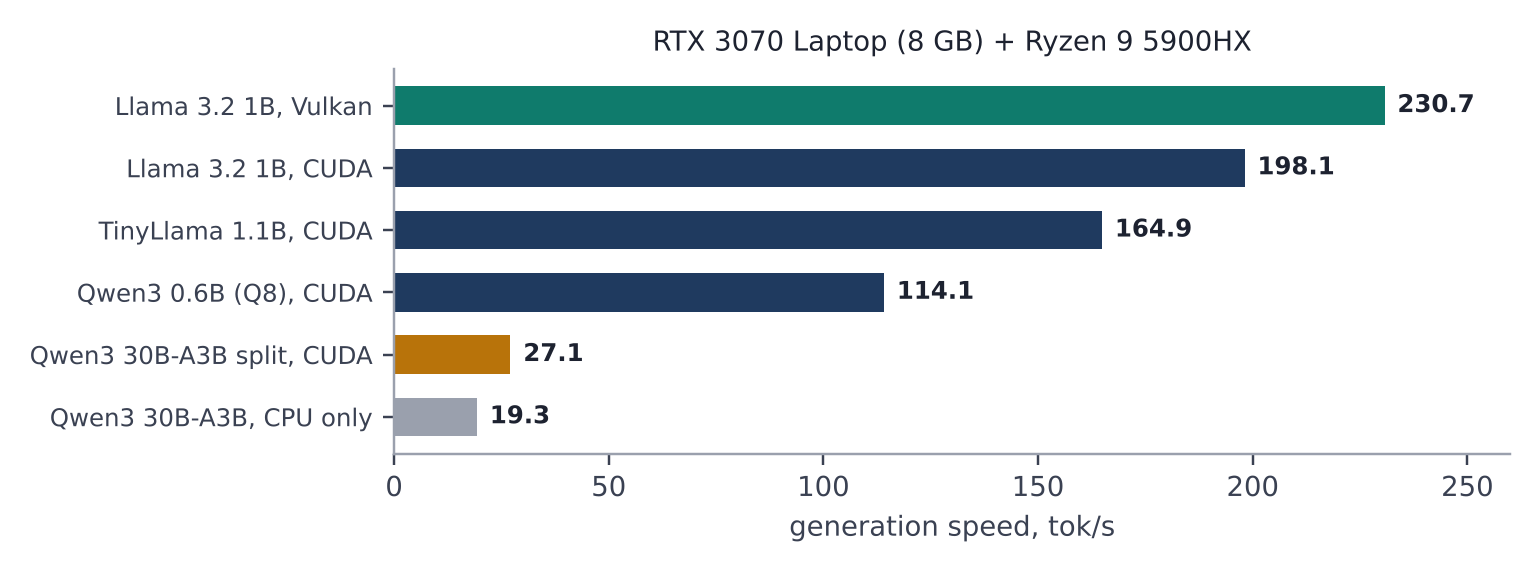
Bar chart of generation speed on an RTX 3070 laptop: Llama 3.2 1B 230.7 tok/s on Vulkan and 198.1 on CUDA, TinyLlama 164.9, Qwen3 0.6B 114.1, Qwen3 30B A3B split between VRAM and RAM 27.1, and CPU only 19.3.
Generation speed on an RTX 3070 laptop GPU (8 GB) with a Ryzen 9 5900HX. Qwen3-30B-A3B (14.7 GB) is split between VRAM and RAM.
How it works

VRAM first, then RAM, then (soon) SSD

The tier loader

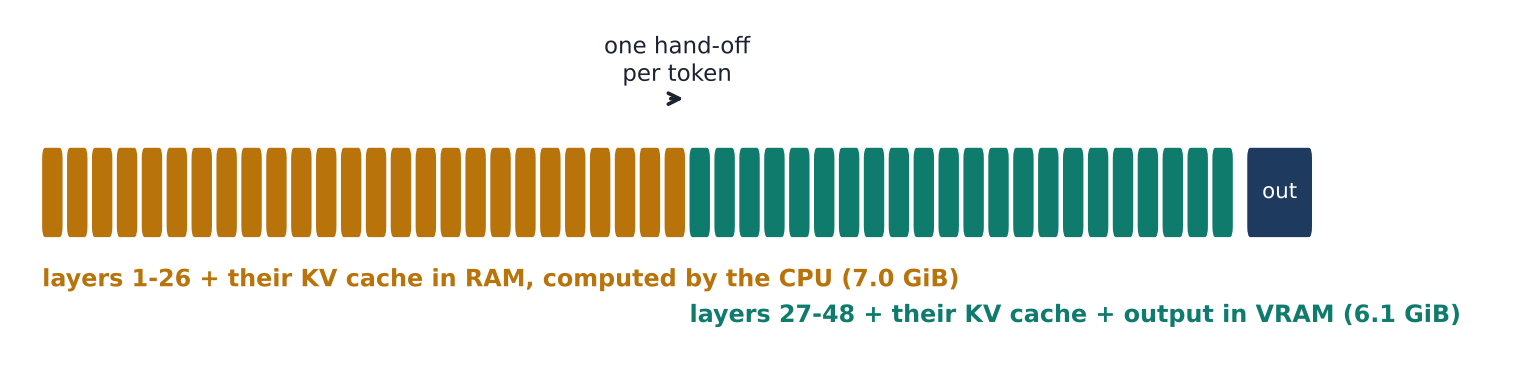
Before loading, tierlm works out where every piece of the model should live. If it all fits on the GPU, it runs there. If it doesn't, whole layers go to VRAM (with their part of the context) and the rest stay in RAM, where the CPU computes them. Each word crosses from CPU to GPU just once.

Its own engine

tierlm is written from scratch in C++ on ggml's math kernels. It does not use llama.cpp: the tokenizers, model graphs, memory planning, tier loader, server and web app are its own, and every model family is checked against an independent reference.

Diagram: Qwen3-30B-A3B's 48 layers, with layers 1 to 26 and their KV cache in RAM computed by the CPU (7.0 GB) and layers 27 to 48 plus the output layer in VRAM (6.1 GB), and one hand-off per token.
How Qwen3-30B-A3B (14.7 GB) is placed on an 8 GB RTX 3070: the first 26 layers in RAM, the last 22 and the output layer in VRAM.
Screenshot of tierlm's memory bars: VRAM with model 6.18 GiB, context 323 MiB, working memory 768 MiB and other programs 768 MiB; system RAM with model 8.52 GiB, context 445 MiB, Windows and other programs 9.30 GiB and 13.1 GiB free.
The setup screen shows exactly where the model, its context and other programs sit, before you load anything.
Get started

Three steps, nothing to install

  1. Download from GitHub Releases and extract it:
    tierlm-0.2.0-windows.zip (1.1 GB, includes NVIDIA's CUDA engine: get this for an NVIDIA RTX card)
    tierlm-0.2.0-windows-lite.zip (55 MB, Vulkan: Intel Arc, AMD Radeon, or no GPU)
  2. Get a model in the GGUF format from Hugging Face, or point tierlm at your LM Studio models folder. A good first big model: Qwen3-30B-A3B or Qwen3.6-35B-A3B.
  3. Double-click start-tierlm.bat. Your browser opens the setup screen: it shows your hardware and where the model will go. Pick a model and chat.

What you need

Windows 10 or 11, 64-bit, with an AVX2 processor. At least 32 GB of RAM to run models bigger than your GPU; 64 GB or more recommended. Your normal graphics driver: no CUDA toolkit, Python or SDKs.

How big can I go?

The model has to fit in VRAM and RAM together, with about 8 GB to spare: roughly 30 GB with an 8 GB GPU and 32 GB of RAM, 60 GB with 8 GB and 64 GB, 85 GB with 32 GB and 64 GB.

Models

Supported families

FamilyExamplesStatus
Qwen3.5 / 3.6 MoE (hybrid)Qwen3.6-35B-A3B, Qwen3.5-122B-A10BTested
Qwen3.5 / 3.6 / 3.8 dense (hybrid)Qwen3.8-27B, Qwen3.5-9BMath verified
Qwen3 and Qwen3 MoEQwen3-0.6B to 32B, Qwen3-30B-A3BTested
Llama 3 / 3.1 / 3.2 / 3.3Llama-3.2-1B, Llama-3.1-8B, Llama-3.3-70BTested
Llama 2, Mistral 7B, TinyLlamaMistral-7B-Instruct, TinyLlama-1.1B-ChatTested
Mixtral, Qwen2 / 2.5Mixtral-8x7B, Qwen2.5-7B, Qwen2.5-CoderMath verified
OLMoEOLMoE-1B-7B-0924-InstructTested
Qwen3-Next, Gemma, Phi, DeepSeek, gpt-ossQwen3-Coder-Next, Gemma 3Not yet

Any quantization from any publisher (bartowski, Unsloth, the model makers) works for a supported family, including multi-part files (-00001-of-0000N.gguf), which load as one model.

For other apps

OpenAI-compatible API

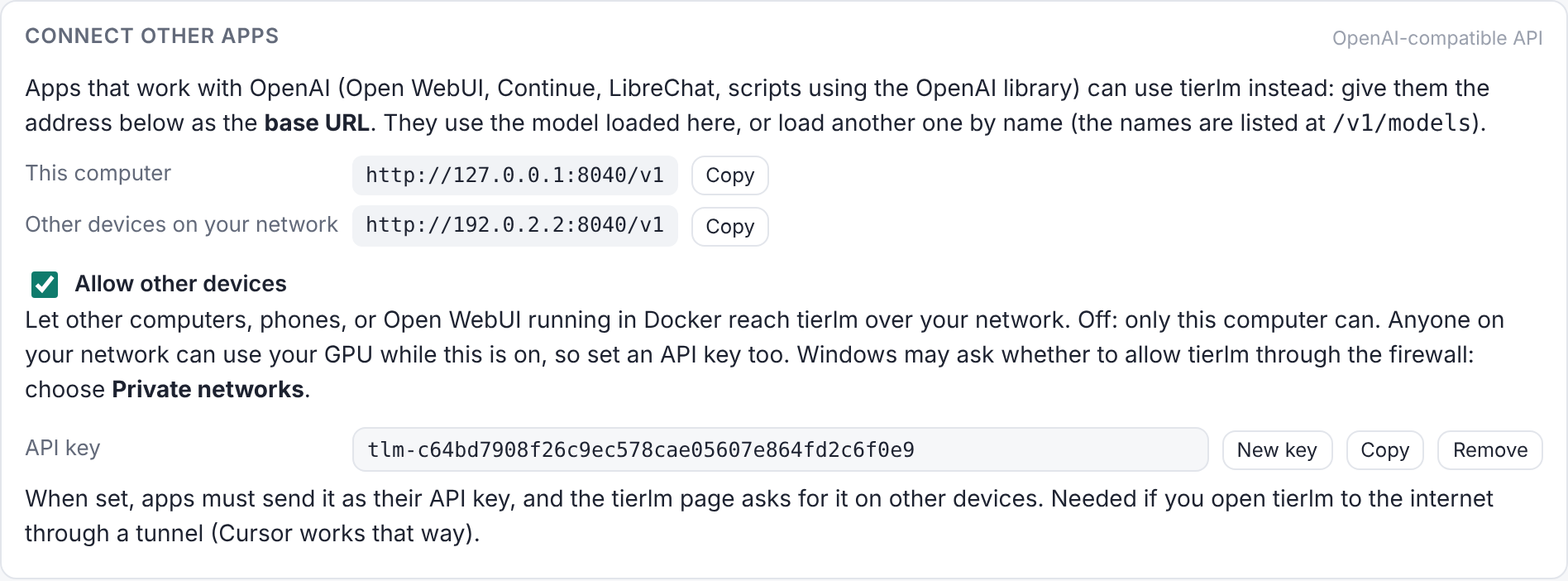
Open WebUI, Continue, LibreChat and anything built on the OpenAI SDK can use the model loaded in tierlm. An Allow other devices switch (off by default) and an optional API key decide who can connect.

from openai import OpenAI
client = OpenAI(base_url="http://127.0.0.1:8040/v1",
                api_key="not-needed")
reply = client.chat.completions.create(
    model="any",   # uses the model loaded in tierlm
    messages=[{"role": "user", "content": "Hello!"}],
    stream=True)
for chunk in reply:
    print(chunk.choices[0].delta.content or "", end="")
Screenshot of tierlm's Connect other apps card, with the API addresses for this computer and other devices, the Allow other devices switch turned on, and an API key.
Roadmap

What's next

Hot-expert cache

Watch which experts the router actually picks and keep those in VRAM, instead of whole layers.

SSD tier

Stream rarely used experts from an NVMe drive, for models bigger than VRAM and RAM together.

More models, and tools

Qwen3-Coder-Next in the next release, then Gemma 4, gpt-oss and more; tool calling for coding agents such as Cursor and Cline.